Spending $10,000+ a day on ads? 3 ad platforms. 7 buyer dashboards. 1 screen that runs it all.
Run your own campaigns? Or pay a media buyer and take their word for it? A lead company put all 400 of its campaigns on one screen: what each one really earns, and a click to raise, cut, pause or build. It works for anyone running ads, at $2,000 a day or $20,000.
Based on a real project. Names, details and figures changed for privacy and illustration.
The business
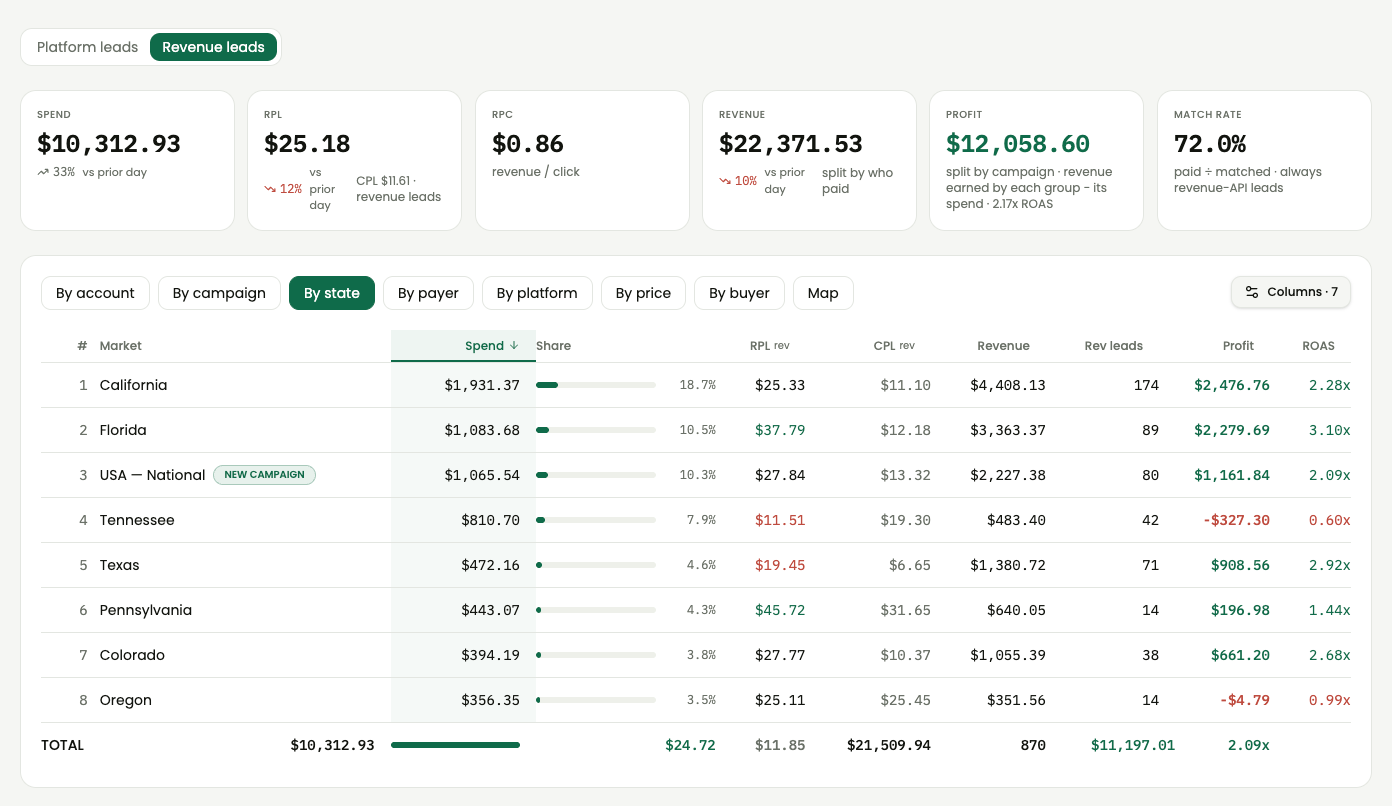
9:05 AM. You open one screen. Every campaign, ranked by what it really earned. Green is making money. Red is bleeding it.
A few clicks: more budget for the winners, the drains cut or switched off, new campaigns for the states that work.
400 campaigns. 45 ad accounts. Nobody opened an ad account.
This is for you if:
- You run your own campaigns. Your mornings go to opening ad accounts to see what happened, then opening them again to fix it.
- You pay media buyers and only see their reports. You can't check a thing, so you hope.
Either way, this is the screen that shows you the real numbers and lets you act on them. It works at any budget, $2,000 a day or $20,000.
The example: a mortgage lead company runs 400 campaigns on Facebook, Google and Bing and sells each lead to one of 7 buyers, who pay per lead up to a daily limit. Profit on paper is simple. Seeing it, and acting on it, is not. AI built one screen that handles all of it.
The problem
3 ad platforms. 7 buyer dashboards. That's 10 places to look before you can say whether one campaign made money.
The spend lives in the ad platforms: Facebook alone was 45 ad accounts, plus Google and Bing. The revenue lives with the buyers, each in a separate dashboard. Some let you pull the numbers automatically. Some are an old-school login page with nothing to connect to. The clocks don't match, so the real answer shows up a day later, after someone matches every paid lead to the ad that bought it. And if a media buyer runs it for you, you get the report they send, and that's all you get.
Then comes the second job: acting on the answer. Three ways to be late:
- Too late to see. A campaign loses money all morning. The proof arrives tomorrow.
- Too slow to change. With 400 campaigns in 45 ad accounts, "we should pause these" becomes a day of clicking.
- Too late to stop. A buyer takes a fixed number of leads a day. After that, the next lead pays nothing. The ads don't know. 240 campaigns keep spending until someone opens 45 ad accounts, one at a time.
One hour of spend is about $400 at $10,000 a day, and about $80 at $2,000. Every hour you're guessing costs real money.
What we built
So we built one screen with three jobs: see it, manage it, guard it. It also checks itself and keeps itself connected.
See it: the truth, any time you look
Spend flows in from Facebook, Google and Bing. Revenue flows in from every buyer: through the buyer's own connection where there is one, and for the old-school dashboards, by reading the login page on a schedule. Every 15 minutes the board lines it all up and traces each paid lead to the campaign that bought it. When it can't be sure, it flags the lead for review instead of guessing. That's how “we made money” becomes “this campaign made money.”
Then it slices the numbers every way you'd ask: campaign, state, platform, buyer, ad account.
Manage it: raise, cut, pause, build
Pick a time window and a minimum return. The board ranks every campaign and sorts them into lists: paused campaigns beating your minimum (switch these on), running campaigns under it (stop these), and the ones doing fine (leave them alone).
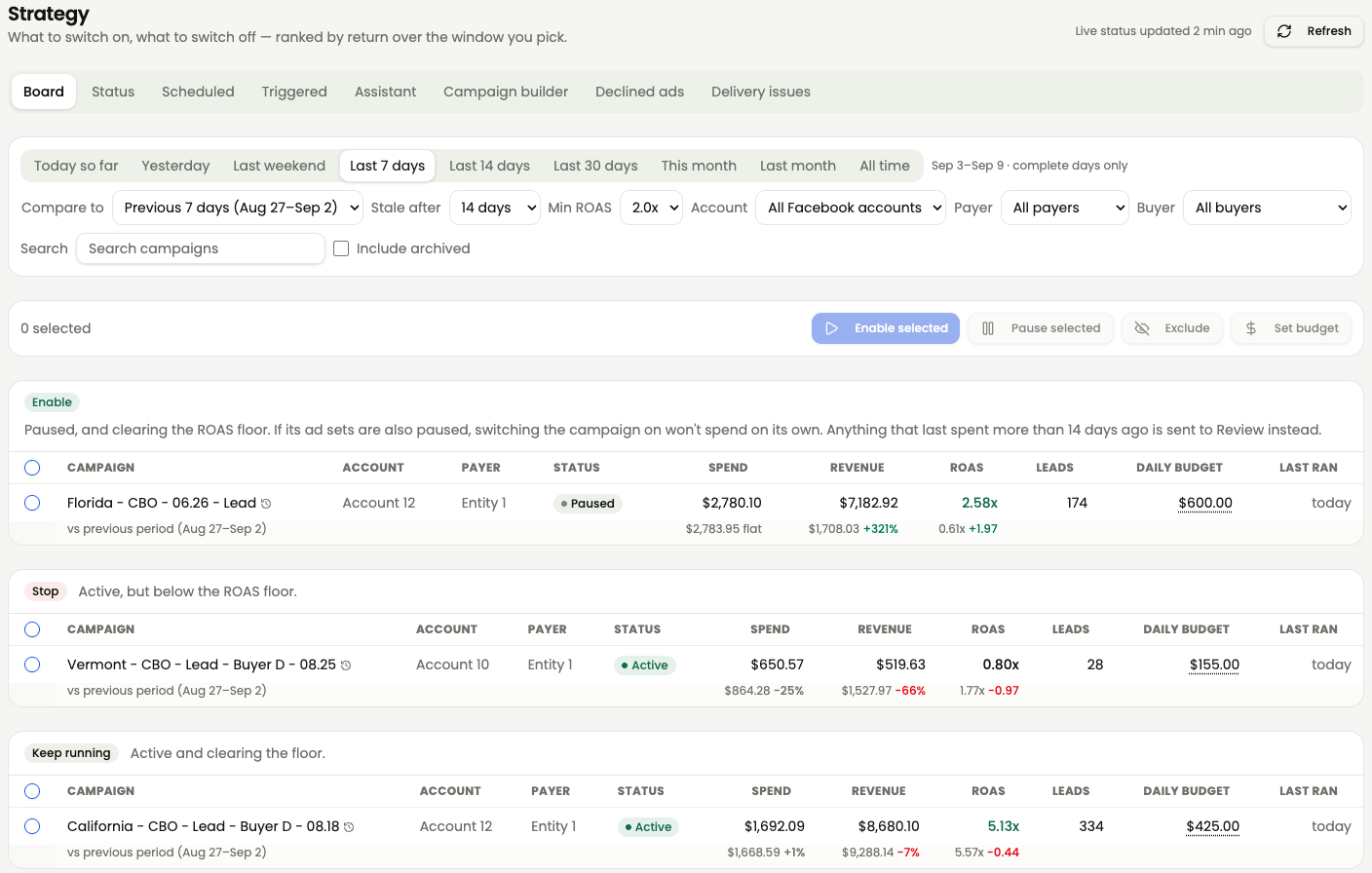
Then act right there. Select campaigns, switch them on, pause them or set a new daily budget, across all 45 Facebook ad accounts at once. A morning of clicking becomes one click. Every change is logged and can be undone for 24 hours.
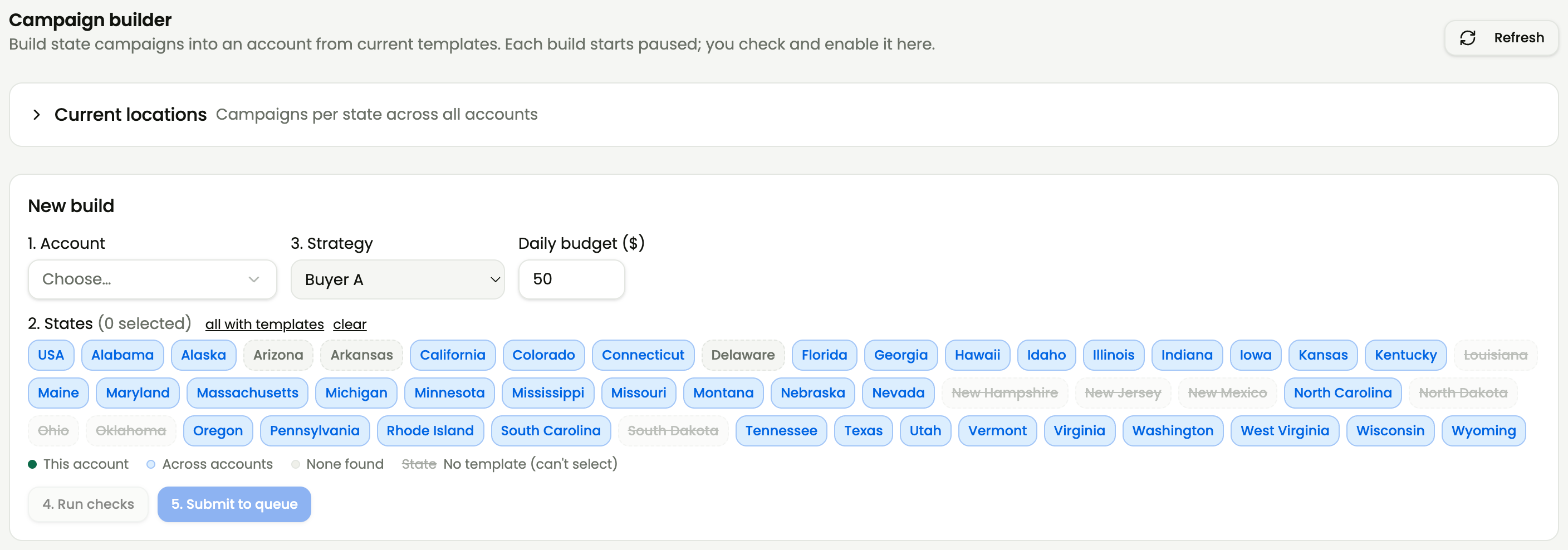
A state is working? Build the next one. Pick an ad account, the states and a budget, and the board copies your top-spending campaign in each state. It checks for duplicates first, and every new campaign starts paused until you switch it on.
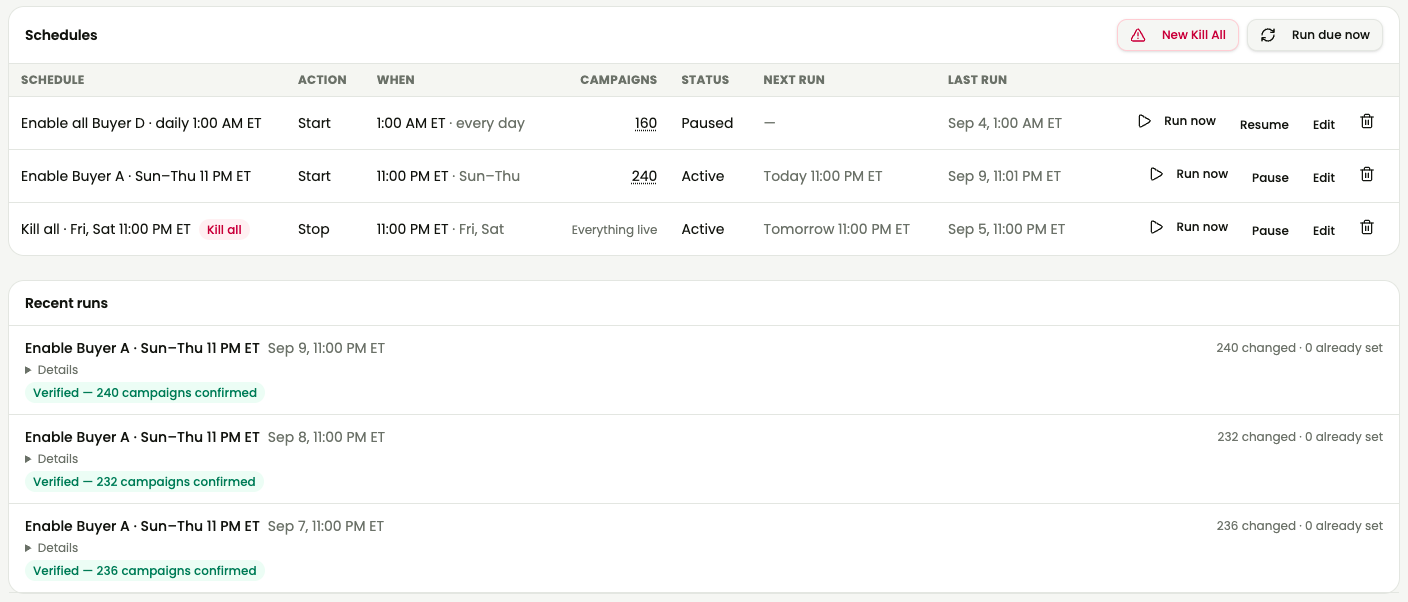
A lot of this runs by itself. Campaigns start and stop on schedules you set, every run is checked afterwards, and any ad account with live campaigns and no schedule gets flagged.
Next up: ask the board in plain English, like “which campaigns should I pause this week?” It proposes the changes, and nothing happens until you approve. That's the next case study.
Guard it: the drains shut themselves off
The daily-limit switch. At 4:52 PM one buyer's daily limit fills. The lead system sends the board a secret message, and within seconds 240 campaigns across 45 ad accounts pause. No phone call. No scramble. Nobody at a keyboard. The board checks with Facebook that every one actually stopped, and the schedule starts them again when that buyer's day resets.

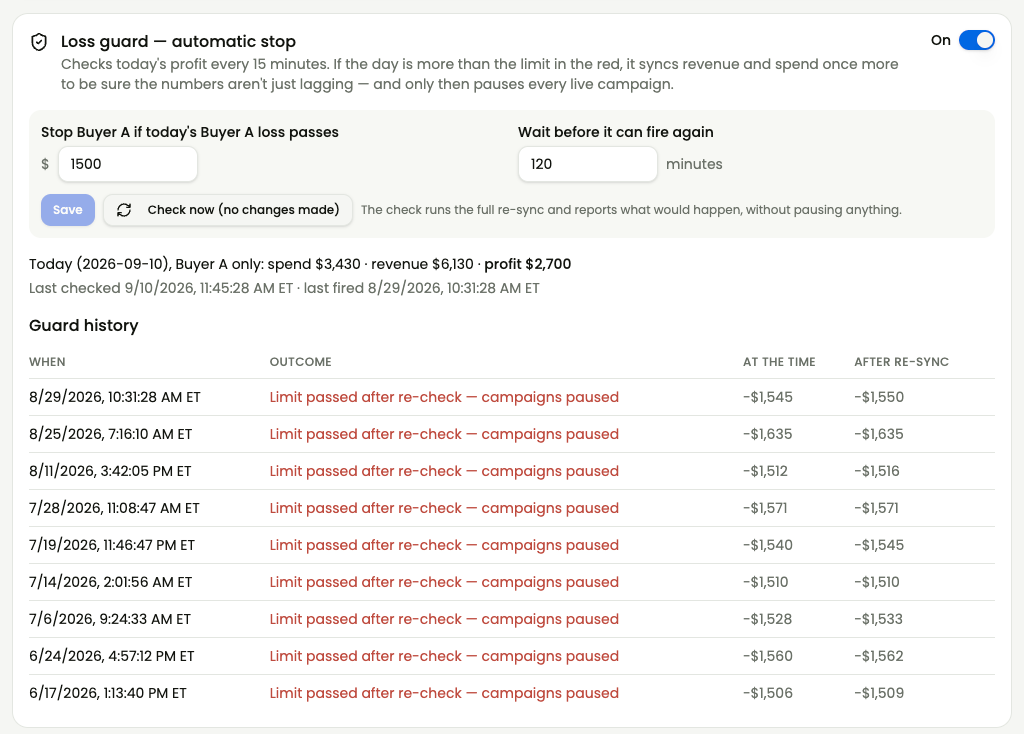
The loss limit. Every 15 minutes the board checks the day's profit. If the day is further in the red than your limit, it pulls the numbers one more time first, so a late report can't shut off good campaigns. Only then does it pause everything. In the last three months it stopped nine bad days right at the limit.
The kill switch. Want everything off? One click pauses every Facebook campaign.
It checks itself
A dashboard you can't trust is worse than none, so this one is its own quality control:
- On is not the same as running. It checks that campaigns marked on are really delivering, and flags an ad account that was shut off for billing.
- Declined ads get flagged, so nothing sits there looking live when Facebook never approved it.
- No stop on bad data. When revenue can't be matched to a campaign, the board warns you instead of calling a stop.
It stays connected
Here's what most dashboards skip. Platforms change things. Buyers redesign their login pages. A connection that worked yesterday quietly stops, and the numbers go stale with no warning. Normally that takes days or weeks to catch, if anyone does. Here, every connection is checked and adjusted every day, with AI doing the repair work, so the data keeps flowing. If anything falls behind, a banner says so.

What it changes for you
If you run your own campaigns: the grind of opening ad accounts, working out what happened and fixing it one account at a time becomes a few minutes on one screen. Winners get more money while they're still winning. Drains get cut before lunch, not tomorrow.
If you pay media buyers: you stop being the last to know. You see what every campaign really earned, what's draining right now and what should be switched on, the same numbers your media buyer should be working from. A report stops being something you hope is true and becomes something you can check.
So ask two questions: how long until you know which campaigns made money, and how long until you can act on it? If the answer is “tomorrow,” every campaign gets a free day to lose.
The result
400 campaigns, 1 screen
raised, cut, paused and built from one place, without opening an ad account
| Before | After | |
|---|---|---|
| Where you look | 3 ad platforms and 7 buyer dashboards, 10 places | One screen, any time |
| Knowing which campaigns make money | A day later, matched by hand | Every 15 minutes, by campaign |
| Raising, cutting or pausing | Open each ad account, one at a time | Select, click, done across 45 Facebook ad accounts, 24-hour undo |
| New campaigns | Rebuilt by hand in each ad account | Copied from your top-spending campaign in each state, starting paused |
| A buyer's daily limit fills | Pause campaigns one by one | 240 campaigns pause in seconds, and the board checks they stopped |
| A bad day | Found out the next morning | Stopped at the loss limit, after one more data check |
| A platform or a buyer changes something | Numbers go stale for days or weeks | Connections checked and fixed every day, with a banner if anything is behind |
Late data loses money. This is the data on time, with the controls attached.
Steal this
Want to build this yourself? Here's what it's made of, in plain words.
| The piece | What it does |
|---|---|
| Claude Code | Does all the building: the screens, every connection to the ad platforms and the buyers, the background jobs, and the daily upkeep |
| Hosting | Puts the dashboard online behind a login, so you can open it from any device, any time |
| The Facebook, Google and Microsoft (Bing) advertising APIs | Pull spend and campaign status every 15 minutes. For Facebook, they also pause, resume, change budgets and create campaigns |
| Each buyer's API, or a reader for the old-school dashboards | Brings in what each buyer paid, lead by lead. A buyer with only a login page gets a reader that logs in and pulls the numbers on a schedule |
| A database | Keeps every lead, every day of spend, and a log of every action with a 24-hour undo |
| A scheduler | Runs the 15-minute sync, a full re-check overnight and the nightly campaign starts and stops |
| A webhook | A private web address the lead system calls, with a secret phrase, when a buyer's daily limit fills. That call triggers the pause-everything switch |
| An AI model API (Claude or OpenAI) | Lets an AI model read your numbers and help analyze them: which campaigns to scale or pause, what changed, why a day went red. It proposes, you approve |
The hardest part is matching every paid lead to the campaign that bought it, lining up each buyer's day with each ad platform's day, and keeping every connection alive when the platforms and the buyers change things without telling you.
Prefer not to build it? Have us do it for you.
Is your business in the same spot?
In 30 minutes we'll look at your version of this problem and how an AI system could handle it for you.
Book a 30-minute consult, $99