
The front desk used to dread the busy season. Now their software wish list gets built in hours, not weeks.
For businesses whose team works around its software, especially ones that take orders, bookings or appointments: heating oil, propane, dumpsters, HVAC, salons, clinics, contractors. One heating oil company had its software rebuilt around how it really works, and new ideas get built in hours.
Based on a real system. Names and client details changed; screens show sample data. The click count and the build times are my own rough figures, not measured. Results vary.
The business
It is a Monday in the busy season at a heating oil company. The phone has been ringing since 7:30.
At the front desk, someone logs in to another computer over remote desktop, just to open the office program. It looks like it comes from another decade.
An order came in online overnight, in a separate system, so it gets typed into this one. By hand.
The customer filled in the whole order, but the page could not show them a delivery date. The schedule is too customized for it to handle. So the office works out the date and calls to tell them.
The front desk is not looking forward to this season.
Same Monday, new system.
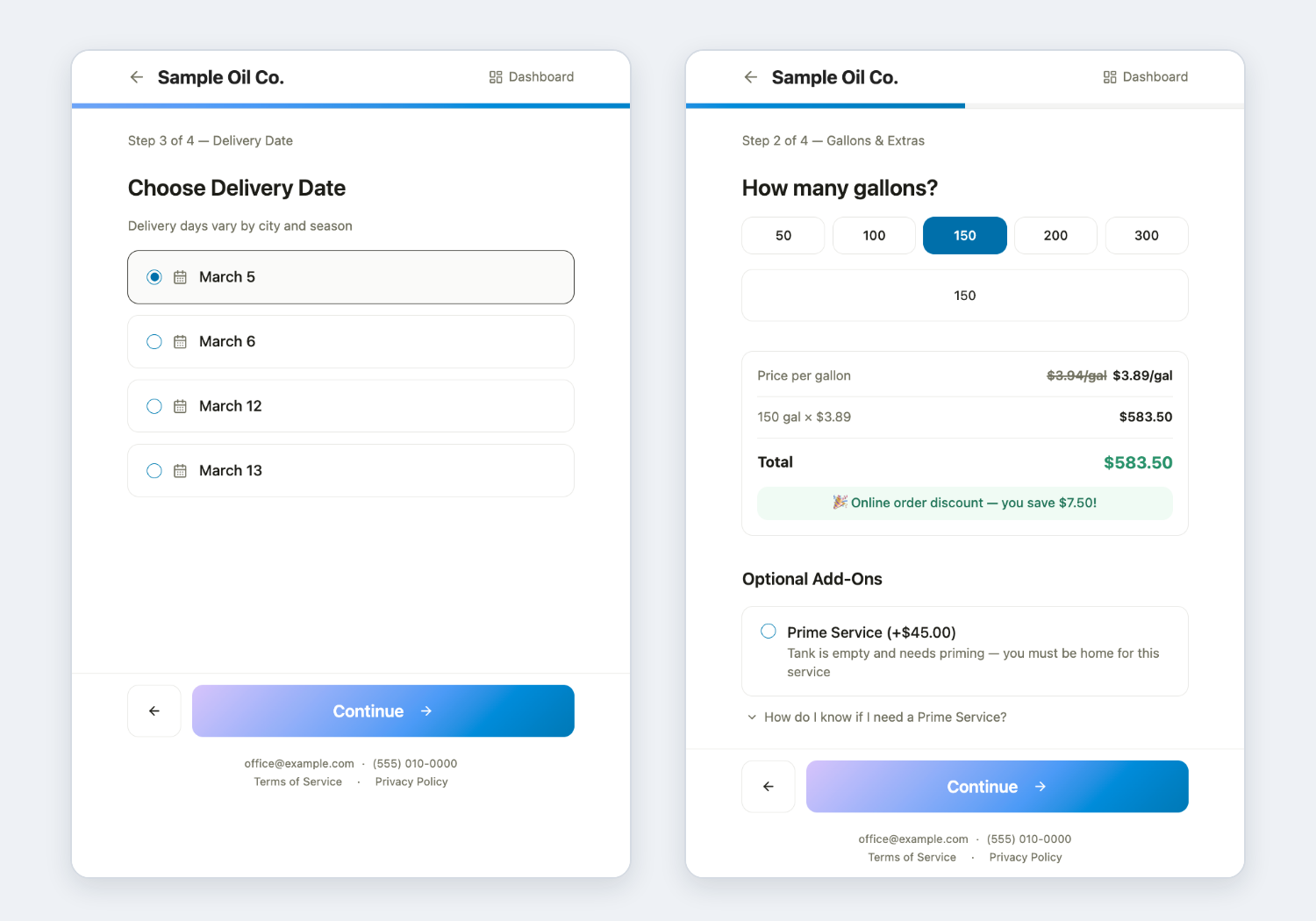
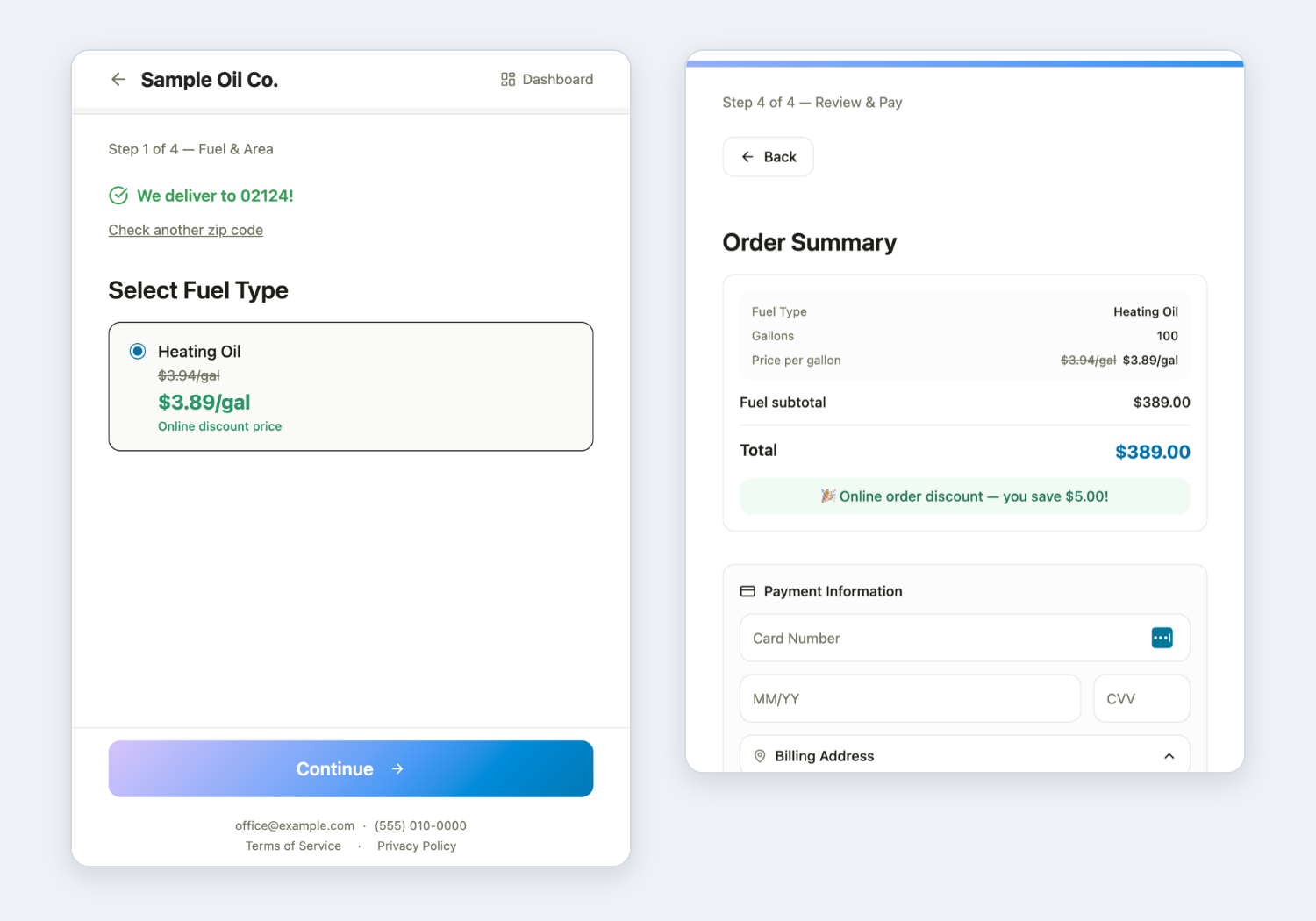
The customer ordered online and picked from the delivery dates that are actually available for their address. The delivery ticket prints on the printer the office already owns.
The office did not retype the order, and it did not have to call to explain the delivery date. The front desk is looking forward to this season.
Later that week, someone at the front desk says, “Wouldn’t it be great if...” The idea is built the same day, often within hours.
An illustrative scene, not a log of one day.
The short version. A heating oil company ran its office on an old program that only worked on one computer, and its online orders came in through a separate system, so the office retyped them by hand. The delivery schedule follows the place and the time of year, so customers could place an order but could not see their delivery date, and the office phoned them. We built one system, with AI, around how the company really works. Customers pick from the delivery dates available where they live, online and phone orders sit in one history, a typical office task went from about 15 clicks to a few, and the office’s new ideas get built in hours.
This is for you if
- Customers place the whole order, then someone has to call with the delivery date.
- The busy season is something your team survives, not something they enjoy.
- Your business has its own odd rules, and your software has no place for them.
- You have a “wouldn’t it be great if...” list you stopped writing down.
The business
A heating oil delivery company in its busy season: orders arrive by phone and online, drivers are on the road, and the delivery dates available depend on where the customer is and the time of year.
The problem
What the office worked around
The office program was old and ran on one computer. The company’s version of “the cloud” was remote desktop, and it was hard to look after from anywhere else. It had many issues the office worked around, because it did not match how the business operates.
- Online orders lived in a separate system. The program had no online ordering, so another system took web orders. The systems did not talk to each other, so the office typed those orders in again.
- The delivery date was unclear. This company runs a custom schedule for spring, summer and winter, and which dates the trucks can deliver depends on where the customer lives. The online system had no way to hold rules like that, so a customer could fill in the whole order and still not know the delivery date.
- The office did the phoning. The office worked out the delivery date and phoned the customer to say it. That did not work for the company.
- Retyping meant matching. Entering the same order again and checking the copies against each other is where mistakes come from.
What we built
What was built: one system around the way they work
Some of the parts that matter most.
A calendar that already knows the schedule
Think of a calendar that changes with the time of year. The company has a custom schedule for spring, summer and winter. In each one, the trucks reach an area on certain dates, and each area follows its own pattern. The schedule is built into the system, so the office does not have to work it out by hand. The customer enters where they live and sees only the delivery dates that apply to them right now. Fewer phone calls and fewer upset customers. The order also offers the extras the company sells, like priming, which gets fuel flowing again after a tank runs empty, and emergency delivery, so adding one is easy.
The wish list
The office keeps having ideas to save time, speed things up or improve things. With old-school software, an idea like that meant days or weeks of custom development, or it did not happen at all. Here, by my rough count, small requests are built the same day, often within hours. That gap is the difference between traditional development and building with AI.
Set up once, not typed again
The system already knows the company’s products, delivery areas and schedules, so staff do not enter them again. By my rough count, a typical office task that took about 15 clicks in the old program now takes a few.
One list, one history
Customers order online and can see their online order history and their full history, including orders the office placed over the phone. The office works from the same list: place a new order, look back through the whole history. Orders are entered once, so the checking and matching between separate systems is gone.
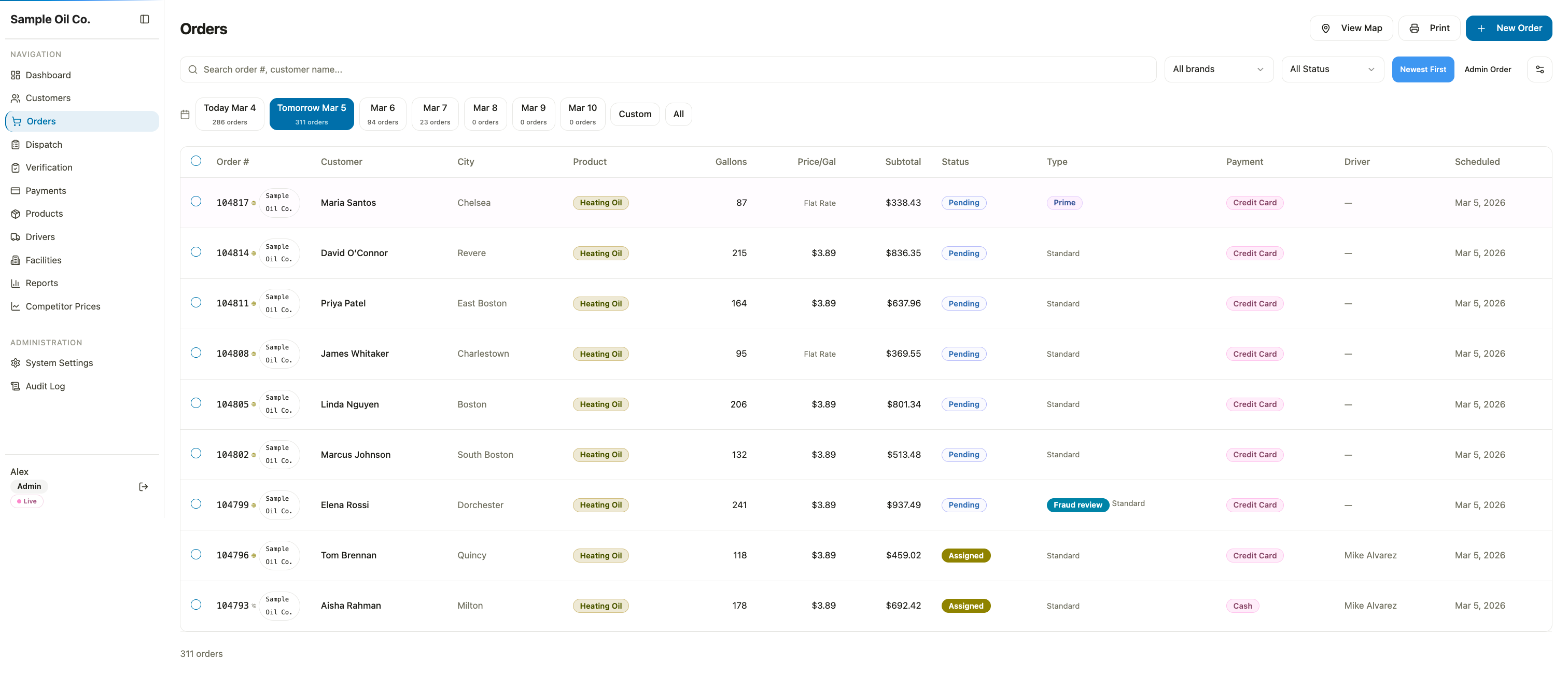
Tickets and reports without the retyping
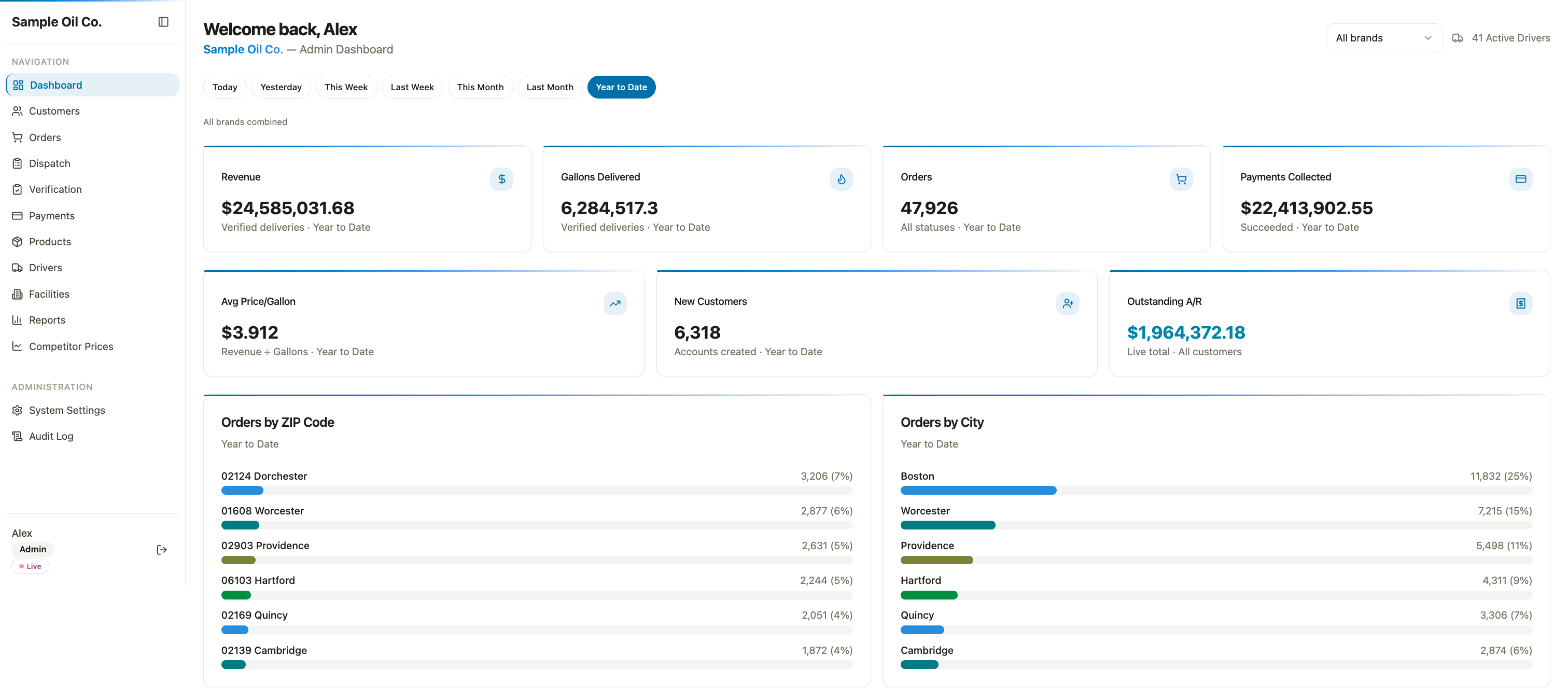
Delivery tickets print on the printer the office already owns, with no manual editing. The office builds whatever reports it needs and can look at them as pictures. Tax season is easier, and business decisions are easier too.
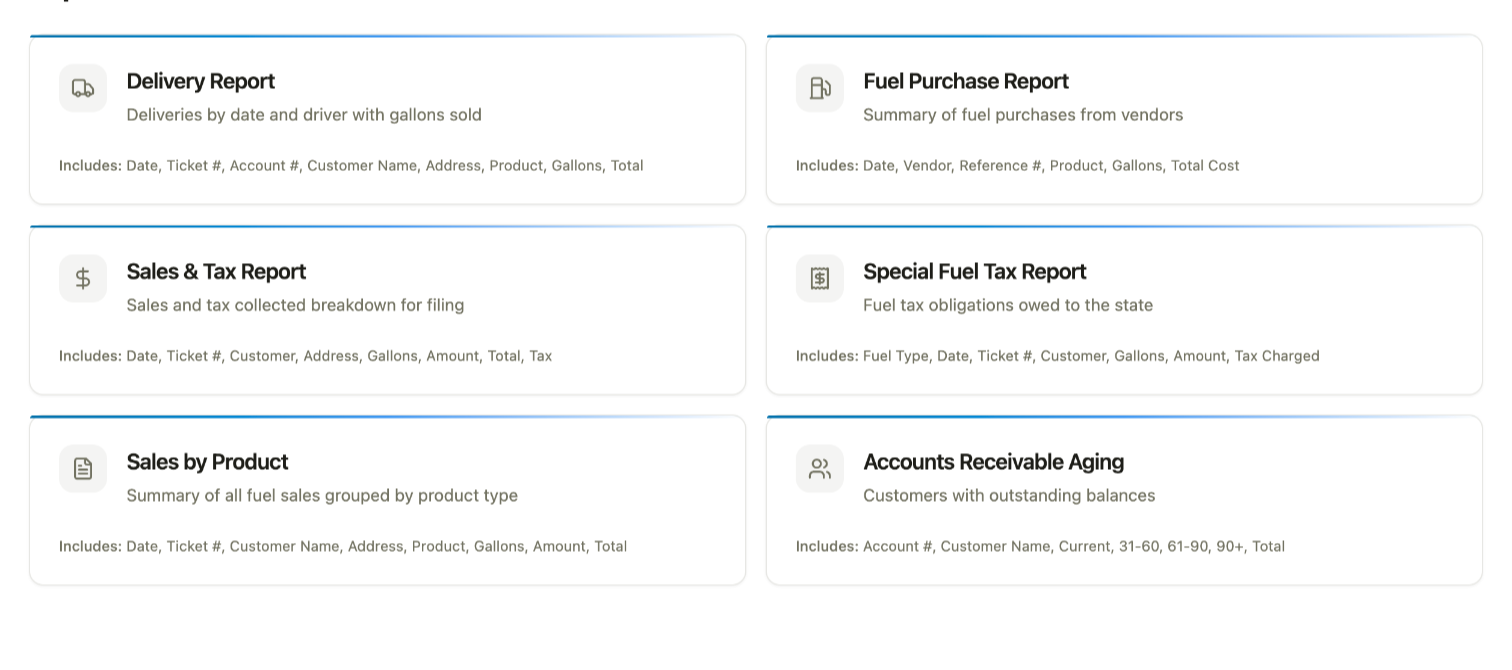
Routes for the drivers, on a map
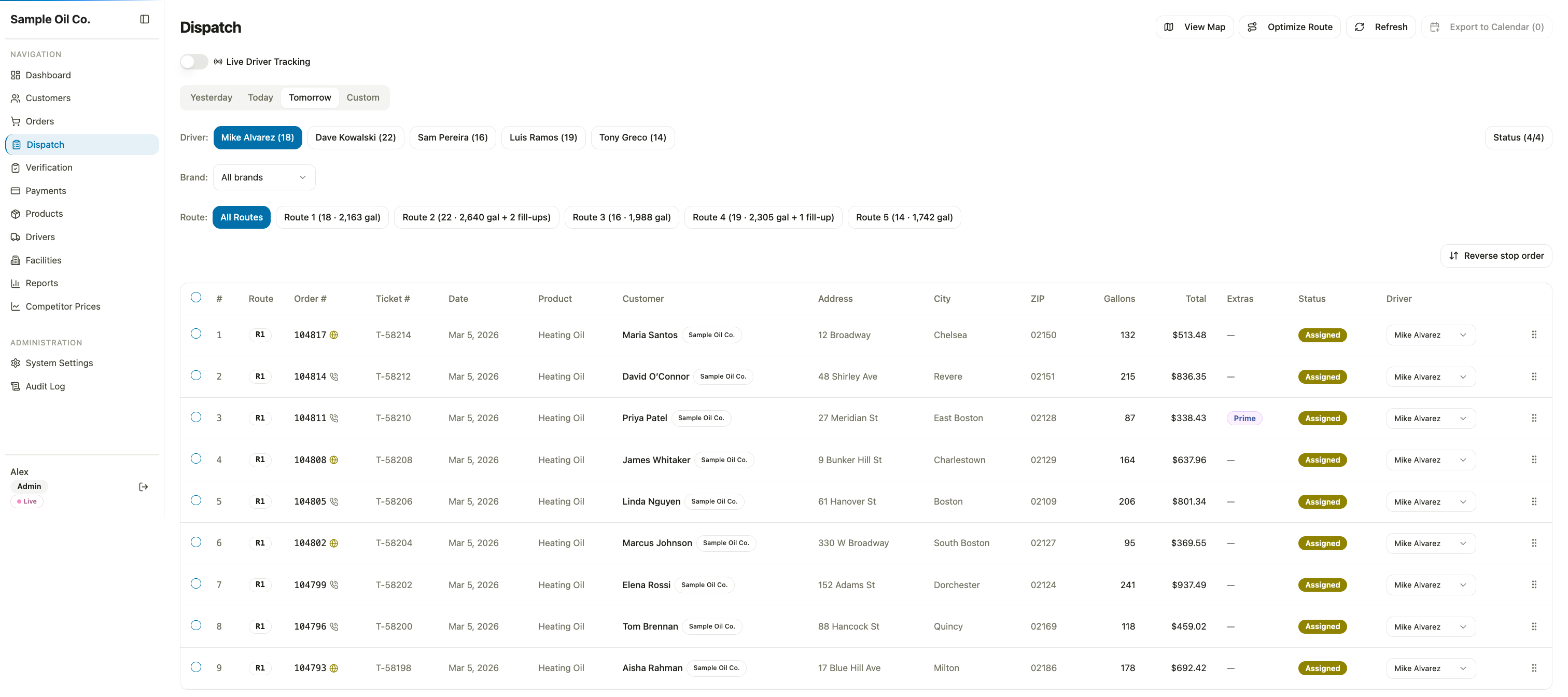
Dispatch puts each delivery date in front of the office, split by driver and route. A route shows on a map with the stops in order, the drive time and the distance, and the stops can be dragged into a new order. Driver tracking and delivery verification sit in the same system.
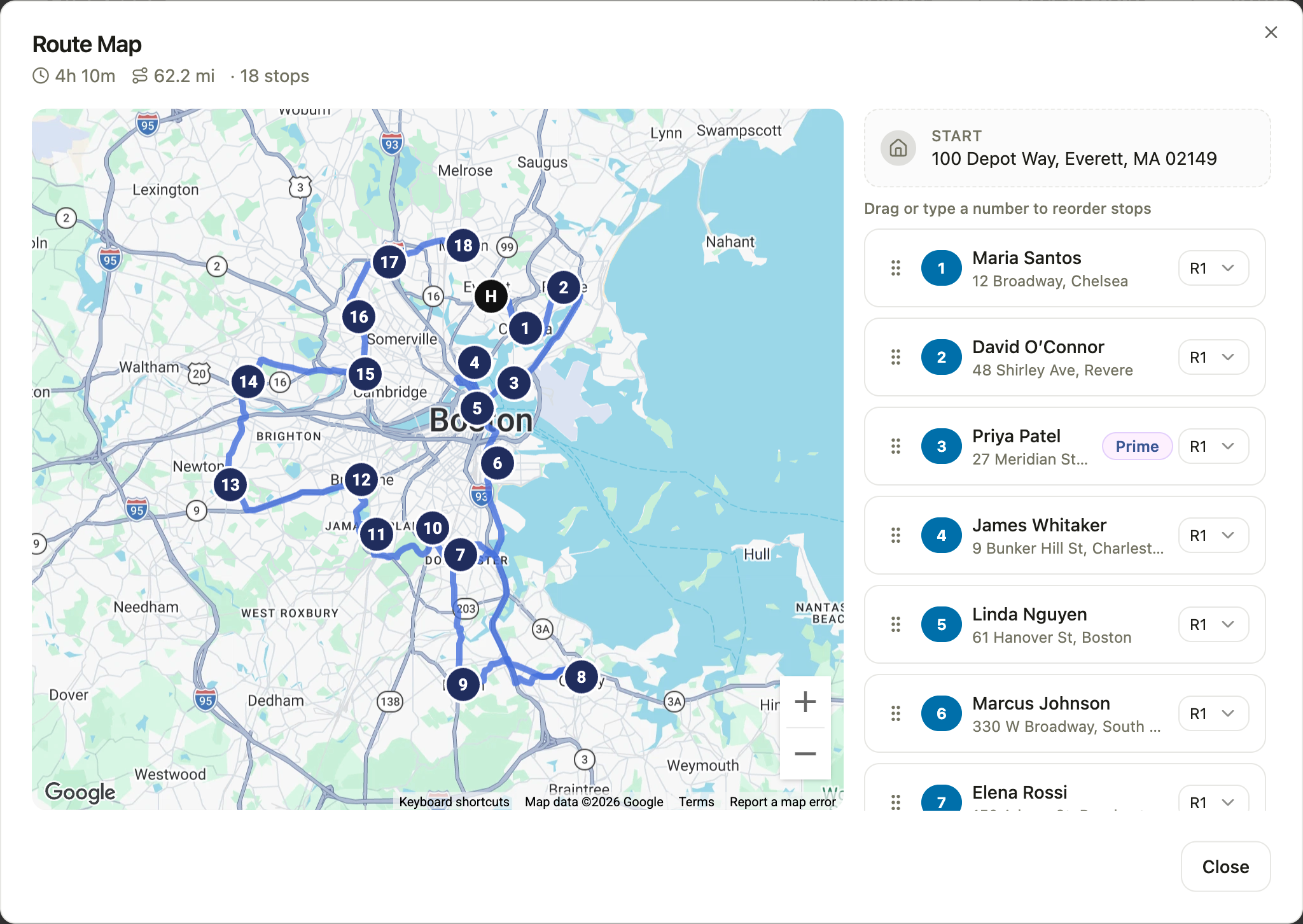
The rest of the office sits in the same place
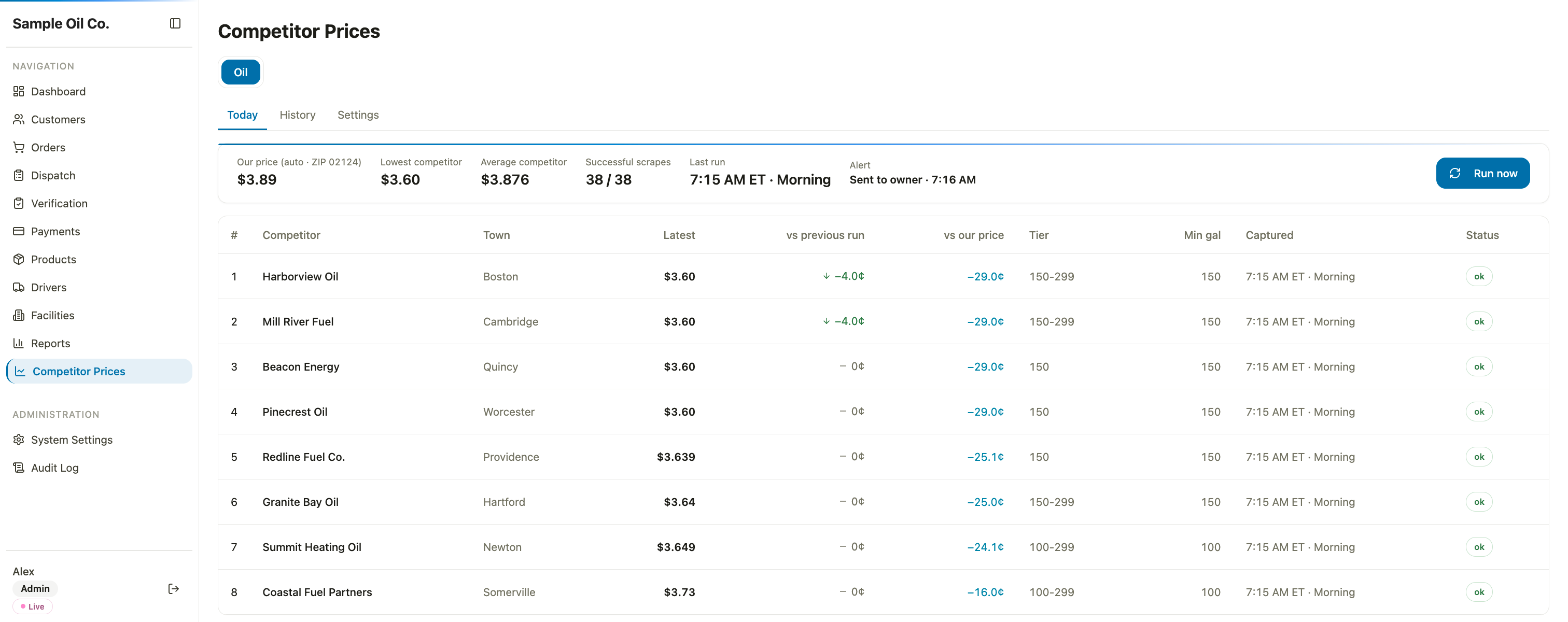
The same system also runs inventory, receivables and an audit log. Inventory keeps track of the fuel bought, the fuel delivered and what is left in the tanks. The competitor price tracker from Day 3 and the fraud check on online card orders from Day 8 are parts of it as well, and the price tracker shows each competitor’s latest price next to the company’s own. The office works in one place, not in a pile of separate tools.
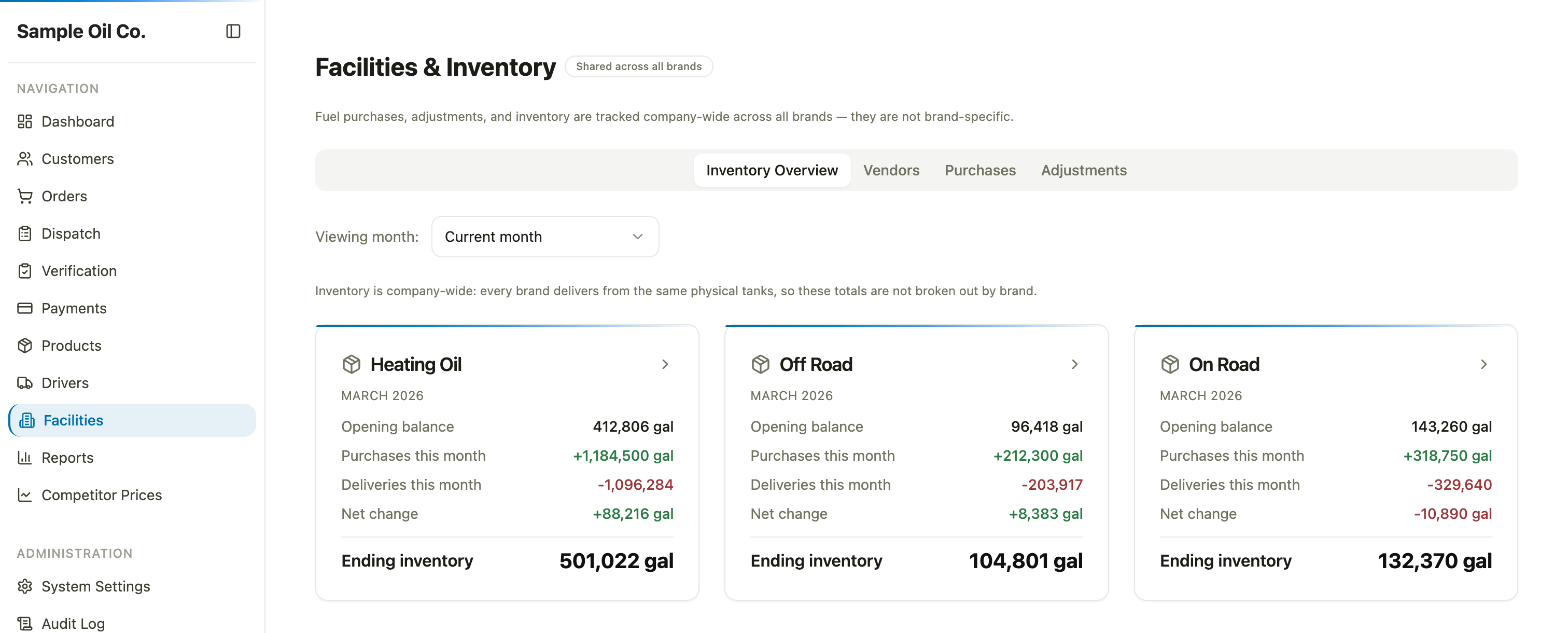
Why not just buy software?
There used to be a choice. You bought cookie-cutter software and worked around it, or you hired a company to build it for you. By my estimate, a custom build took six months to a year and hundreds of thousands of dollars, so most businesses bent to the software. Now, in my experience, a custom system can go from start to launch in weeks, for a fraction of the cost. My opinion: a business that bends to its software loses ground to one whose software bends to it. It is the same argument as Day 12, a towing company, for a different business.
The result
About 15 clicks to a few
for a typical office task, by my rough count, with online and phone orders in one system
The result
| Before | Now | |
|---|---|---|
| Online orders | Typed in again by hand | Already in the system |
| Delivery date | The customer ordered, then the office worked out the date and phoned | The customer sees the available delivery dates for their address while ordering |
| Order history | Online and phone orders in different places | One history, for the office and for the customer |
| A typical office task | About 15 clicks | A few clicks |
| Mistakes from retyping | Orders retyped and matched by hand, so mistakes could creep in | Basically gone |
| New ideas | Days or weeks of custom development, or not done at all | Built the same day, often within hours |
| The busy season | Dreaded by the front desk | Liked by the front desk |
What stays human: the office decides what to ask for next.
What it changes for you
- Customers see their delivery date while ordering instead of waiting for a call.
- An order is entered once, and a typical office task takes a few clicks instead of about 15.
- A wish list that gets built in hours, not weeks.
- A busy season your team does not dread.
Now picture yours
The software does not have to be heating oil software. Wouldn’t it be great if...
- the intake form filled in the patient’s chart before they sat down?
- customers only saw appointment slots your shop can really keep?
- the estimate, the crew calendar and the invoice were one record?
- your clients’ documents sorted themselves in tax season?
- customers saw only the delivery dates your trucks can make?
These are wishes, not systems we built.
Want this for your business? Book a 30-minute consult.
What do you wish your software just did? And what does your team do by hand until it does?
Steal this
Want to build this yourself? Here’s how it was built, in plain words. The idea fits businesses whose team works around its software.
| The piece | What it does |
|---|---|
| Claude Code | Builds the whole system and the rules behind it, and builds each new idea from the wish list |
| An online ordering site | Where customers order, pick a delivery date and add extras like priming or emergency delivery |
| Customer accounts and sign-in | Lets each customer see their online history and their full history, phone orders included |
| A booking calendar that follows rules | Shows only the delivery dates available for the customer’s location, following the schedule for the current season |
| Business settings | Hold the products, delivery areas and seasonal schedules, so staff do not enter them again |
| A database | One customer list, with the orders placed online and by phone |
| A card payment service | Takes card payments for online orders |
| A fraud check | Gives each online card order a second look before a truck is sent (see Day 8) |
| Printer setup | Sends tickets straight to the printer the office already has, with no manual editing |
| A dispatch screen | Gives each driver their deliveries |
| Driver tracking | Shows where each driver is |
| Delivery verification | Lets the office check off each delivery that was made |
| Inventory | Keeps track of the fuel on hand |
| Receivables | Shows who owes what, and for how long |
| An AI agent that watches prices | Checks competitors’ prices and texts the owner when they change (see Day 3) |
| An audit log | Records who changed what, and when |
| Reports and charts | Lets the office build its own, including the tax-season ones |
| A web server | Runs it all, so the office uses a web browser instead of remote desktop |
Prefer not to build it? Have us do it for you.
Is your business in the same spot?
In 30 minutes we'll look at your version of this problem and how an AI system could handle it for you.
Book an AI opportunity audit, $249